Sound Systems

Whether hosting a band banquet, setting up a jazz big band, or amplifying the auxiliary percussion of a marching band, knowing the basics of sound systems is a valuable skill for any music educator of performer. What follows is a brief guide on how to get started.

Image result for p.a. system

Everything begins at the microphone. Having as many high-quality microphones as possible helps ensure that a performance or event will run smoothly. To connect the microphone to your mixer, featured above in the top center, simply connect the “female” end of your XLR cable into the MIC OUT XLR port on the back of the mixer/ audio receiver.

Your mixer or audio receiver also controls outputs. These are either “main” or “auxiliary” outputs.

The main outputs include subwoofers, pictured in the bottom left and right, which sound the low frequencies. These are commonly referred to as “subs.” Also in the “main” category are the main speakers, pictured top left and right, which will allow the mid and high frequencies to come through. Some systems allow the speakers to connect straight to the subs, which connect to the mixer. It is important that the subwoofers be placed out in front of the musicians, and ideally in corners OFF the stage or performance area. Isolating the subs in this way prevents low frequency feedback resulting from their classic rumble and a solid sound disbursement.

The auxiliary outputs include monitors, pictured middle left and middle right, which allow the on-stage musicians to hear everything that is going on as the audience hears it. These should be placed so that all musicians can hear sound from the monitors.

Image result for mixer board

The mixer board, featured above, can be operated from the side of the stage or from out in the audience. Operation from the side of the stage allows the sound engineer to assist musicians and receive their feedback more easily, and operation from out in the audience allows for an honest representation of what adjustments sound like. Modern mixers can also be controlled from a computer or tablet, pictured below, which allows for easier mobility.
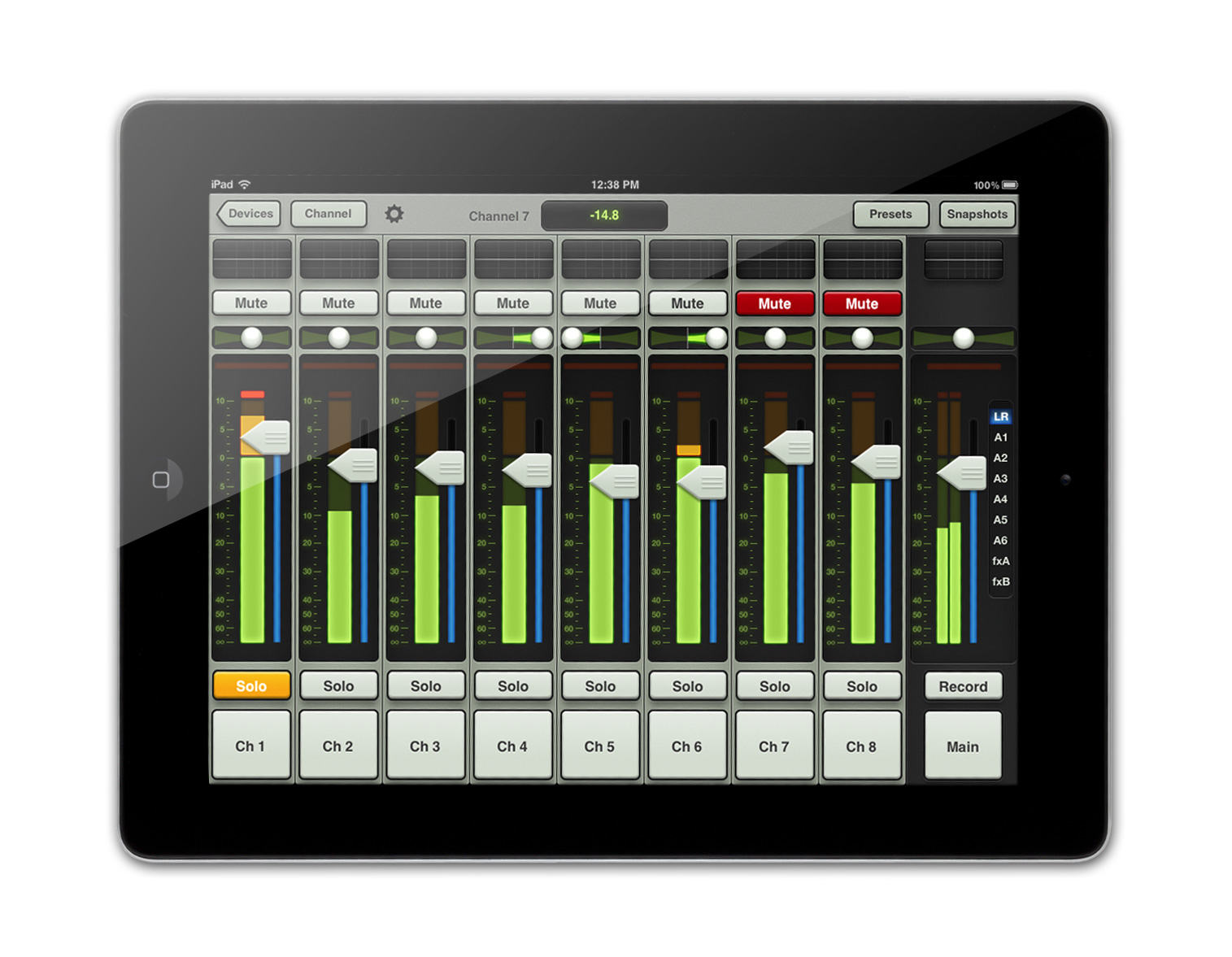
Image result for mixer board ipad

While the above information can seem overwhelming, just remember that everything in a sound system is just an input or an output and most steps are just reproducing connections already made. Enjoy sharing music with the world!

Being an Educator in the Age of Social Media

I created my first and only Facebook when I was in the 5th grade. At the time, this newfound platform for communicating with friends, sharing photos, tagging others in photos, and ranting about the struggles of being a middle-class kid living in the United States was the hottest thing anyone could be doing with their life. Then came Twitter, Kik, Snapchat, Instagram, Vine, Tinder, Facebook Messenger, . . . the list goes on. Now tasked with being an educator, a professional, and a role model for the next generation of students, it can be a little daunting to look back at the electronic history of our young and foolish pasts. What we say, what we do, and how we present ourselves online stays there forever, even if we are not the same acne ridden, gossipy, and over-stimulated kids we once were.

The first step I took when the regret and embarrassment of my past social media presence kicked in was edit my privacy settings, making my social media platforms invisible to anyone unless I had added them as a friend, follower, electronic companion, whatever the term may be. I then deleted old pictures, old posts, and old friends no longer an important part of my professional life. Hitting the delete button may hurt a little at first, especially looking back at that super cool water balloon fight you had in the 6th grade, but feeling secure and in control of our social medial presence can make all the difference. It is especially important to remove the ability for anyone to tag you in a photo or a post without your consent and permission. This can be achieved in the settings of all of the aforementioned platforms.

These steps are especially important regarding a future job position. Employers, parents, and even our own students will potentially be snooping through social media to attempt to learn more about who we really are. This image we create must be one that is professional, unbiased, and indicative of who we are TODAY, not ten years ago. For me, this “social media taming” endeavor even extended to YouTube, where I managed to find videos of myself playing the trumpet at a level I would not want administrators, parents, or my students to see, especially when there is a lack of new content to post as proof of my abilities. I want my trumpet playing skill level to exist in the present as much as possible, with my playing and teaching an ever-evolving craft.

As a music educator and future band director, social media accounts may also become necessary platforms for communicating with parents and students. Rehearsal times, competition scores, and videos of ensembles are often communicated through Twitter and Facebook by modern-day music educators. While email is always the most professional form of contact, students in particular are more easily reached on social media. This interaction should, of course, never include personal messages or direct posts to students or parents, and instead should include blanket statements and ideas for all eyes to see. Therefore, any sensitive information such as a competitive marching band’s rehearsal progress or individual students’ scores or results from solo and ensemble, All-State, or other activities must be shared in good taste. A student, parent, colleague, or administrator should never have to feel embarrassed because of a post to social media. This sentiment also extends to a program’s finances.

In summation, it is important to always be aware, considerate, and in-the-right with regard to social media. We live in a very unique time in which the tools we use to connect and interact can also do serious damage to ourselves and those around us. The eyes of the world are watching to see what kind of impact we can leave in the short lives we live, and this impact for a music educator must never stray from helping students become capable, cognizant, and empowered individuals.

Music Copyright and its Relevance to the Classroom

Within the sphere of copyright influence, there is much debate as to whether current copyright terms are appropriate. As music educators, it is crucial that we remain cognizant of these terms so that we are providing opportunities for students while in full compliance with the law.

One topic of controversy is the length of time that a work can be under copyright, which is currently the life of the author, plus 70 years. Those in favor of this length argue that such ample time encourages publication of new works, supports heirs and those who benefit monetarily, provides for the protection of recorded music, and allows authors and composers to claim performance royalties.

Those opposed to this length of time would argue that restricting use of works for so many years is actually diminishing the collaborative nature of our society. Too long of a hold on ideas is limiting freedom of expression and creative reuses of works. Plus, authors do not benefit from copyright terms that extend beyond their deaths.

In my personal opinion, there must be some backing for composers and authors to publish works without fear of losing out on monetary gain and credit, but the life of the author plus 70 years and the restrictions on copying sheet music can limit the exploration of new pieces, limit an educator’s ability to break from the overplayed literature of a school library, and unfairly hamper an individual’s freedom of expression through music.

Whether or not we agree with the state of copyright law, the way in which we interact and abide by it is important. For example, a music educator must be aware that only some copying of music falls under “fair use” in an educational setting, and an original copy of all music must be obtained. Public performances of works must also be backed by permissions from the publisher or composer, which is often times achieved by simply buying the music. Since most public performances in a school setting are not-for-profit and are solely for educational purposes, an argument for fair use can apply.

In private lesson teaching and face-to-face classroom instruction, it is typically okay to copy already purchased music, with the intent to destroy copies once used. An educator may want to take steps to plan ahead and be sure they are “in the right” before doing any copying. Students are often more impacted by the behaviors and actions of an educator than by the course material, and adhering to the ethical and moral obligations of copyright law can be a valuable model for students.

Using an iPad or Tablet in the Music Classroom

With the emergence of new technology each year, the next generation of students and teachers across the country is embracing tools like the iPad to collaborate and create in order to become active participants in the world of music.

One simple, yet important, component of music education is the ability to record, listen back, and self-evaluate. Whether this be teachers recording the class play a musical passage or students creating and submitting recordings as assignments, iPads provide this basic recording feature such that teachers can assess students and students can assess themselves.

Music educator Jim Phillips, in a post to the NAfME website, advocates for the use of iPad recordings. He says:


“I often take this a step further and record the group then post it to YouTube (UNLISTED link, of course) and come up with a few analysis questions they have to answer in an essay. Submit the essay via email. The possibilities are endless. Come up with your own ideas, or ask the students what they would prefer for feedback. ”

Clearly this form of assessment allows students to present their skills and abilities on their own time, allowing for more music and less assessment in class. This technique also allows students to express themselves on a digital platform that encourages deeper thinking that may be hard to achieve in front of peers.

Along with basic recording capabilities, iPads also promote the use of new apps that can make music-learning more engaging, interactive, and less hierarchical in terms of director talking at students. Music writing, recording, editing, sharing, and practicing applications can provide new experiences and a newfound love for the art.

One of these applications that I use daily in my own teaching and practicing is the Tonal Energy Tuner and Metronome. With this one app, which costs around $4, students have unlimited options for practicing and sharing. According to the Google Play Store and the TE Website, this app features a “state-of-the-art tuner, an advanced metronome, dedicated orchestral strings and guitar tuning page, a piano keyboard, sound analysis page, and audio recording capabilities.”


Using this app I have helped students hear what they really sound like, internalize pitch, and become aware of note tendencies on their specific instruments. This would also be a great tool for ear training and learning via social activity, with possibilities for editing, sharing, and hearing others.

Using this app I have helped students hear what they really sound like, internalize pitch, and become aware of note tendencies on their specific instruments. This would also be a great tool for ear training and learning via social activity, with possibilities for editing, sharing, and hearing others.

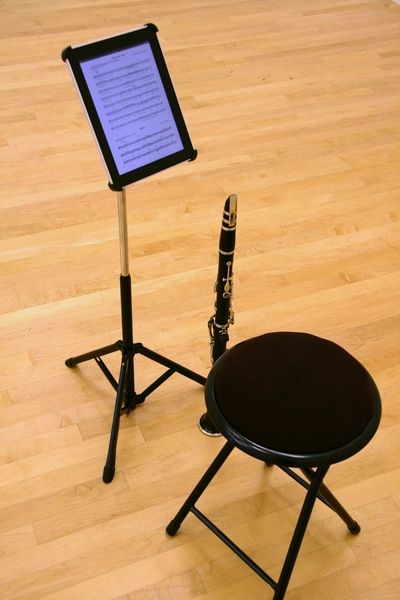
In addition to applications, iPads and tablets can also be used simply to read music. Hundreds of pieces and scores can be stored and viewed perched on a basic metal music stand, with special accessories for turning pages with a button by the performer’s foot.

There are hundreds of other apps out there with similar opportunities for collaboration. Some that I am familiar with include MuseScore for composition, SmartMusic for sight reading and assessment, and iReal Pro for independent or collaborative exposure to jazz.

In school districts and music classrooms that provide these technologies, there is endless opportunity to advance the musical lives of our students, while becoming better musicians ourselves. By exploring these possibilities, we are connecting students to each other and to an ever-evolving technological world.

Technology Trends in Music Education Today

With the emergence of new technologies each and every day, and the incredible way young students have become masters of them, it comes as no surprise that music education is incorporating more technology into the classroom. Hundreds of new applications, software, and innovations provide opportunities for music teachers to connect with students and parents alike. According to Meghan Bogardus Cortez of EdTech Magazine:

“The process lets students use technology in a way that contributes holistically to their learning experience.”

One of these technologies is an app called SmartMusic, which allows a music teacher to create sightreading assignments, listen to student recordings, track overall progress, and much more. Students seem to love the ability to improve via a user-friendly and adaptable digital platform.

More and more school districts each year are opting to provide a one-to-one smart tablet or Chromebook device so that every student can access Smartmusic, or any number of applications, in or outside of the classroom. This newfound connectivity can even bridge the gap between contrasting academic subjects, like English and Music. Meghan Bogardus Cortez describes the use of this tool in a classroom:


“At Angola High School, English teacher Chantell Manahan took advantage of the school’s one-to-one Chromebooks to spice up her unit on poetry, a blog reports. Using Soundtrap, Manahan had her students turn their poems into songs.”

Instead of trying desperately to get students to turn off their phones and tablets and focus within a traditional learning environment, newfound connectivity between student and teacher reduces these concerns. Even better, students are opting to interact with music technology outside the classroom instead of practicing unhealthy habits in social media and video games, helping students grow as creative individuals. Music technology in classrooms can also increase participation in music classes in a school’s student body.

The benefits of technology as a resource for music education are reflected in the embrace of new technologies by administrators and teachers alike. According to a post in the NAfME (National Association for Music Education):


-74% of teachers feel that technology supports and expands the -curriculum
-74% say it motivates students to learn
-73% say it motivates students to respond to a variety of learning styles
-11% use an interactive table
-59% use an interactive whiteboard
-35% use tablets or e-readers
-48% make online lesson plans
-45% use web based/interactive games
-44% use as vehicle for information delivery to students and parents
-Offers easy access to connect with other teachers and musicians
-Leaves time for flexibility in class
-Encourages students to create and showcase their music
-Offers differentiated instruction
-Students have access to new resources and concepts

As technology continues to dominate human life, new educational opportunities through music are making for more effective teachers and better connected students. While some lines must continue to be drawn in managing classrooms with technology, the potential rewards speak for themselves.

Cortez, M. B. (2017, August 17 Published). Tech in the Music Classroom Creates Efficiencies,ImprovesAccessibility. Ed Tech Magazine. Retrieved from https://edtechmagazine.com/k12/article/2017/08/tech-music-classroom-creates-efficiencies-improves-accessibility

Dunn, J. (2014, August 20 Published). How Technology Is Being Used In Music Classrooms.National Association for Music Education. Retrieved from https://nafme.org/how-technology-is-being-used-in-music-classrooms/